Introduction
A ScrewDrivers Print Server often resides in a location geographically remote from application users.
In many enterprise environments, ScrewDrivers Print Servers reside on a heavily-used LAN connection.
For version 6.4, Tricerat is introducing a new feature called ScrewDrivers Print Server Bandwidth Control.
This feature allows customers to better manage print job network traffic with ScrewDrivers Print Servers by metering print job data.
Implementation
Tricerat's Simplify Printing solution virtualizes enterprise printers so users accessing applications on a central host can print anything anywhere through ScrewDrivers Print Servers.
In Windows, application printing is managed by the print spooler, which associates a port monitor with each printer. The print spooler runs as a Windows service and it loads port monitors when the service starts. Each port monitor is responsible for the details of print jobs that are sent to it.
As of version 6.4, Simplify Printing incorporates metering logic into every port monitor through a bandwidth control object. Bandwidth control objects can be enabled and configured or disabled.
The bandwidth control object for a TCP/IP port monitor can be configured so the data sent to the ScrewDrivers Print Server does not exceed the allocated rate.
A bandwidth control object meters all of the print job data sent to a ScrewDrivers Print Server regardless of how many printers are attached to the Print Server.
The diagram below illustrates the components in a ScrewDrivers Print Server bandwidth control solution:
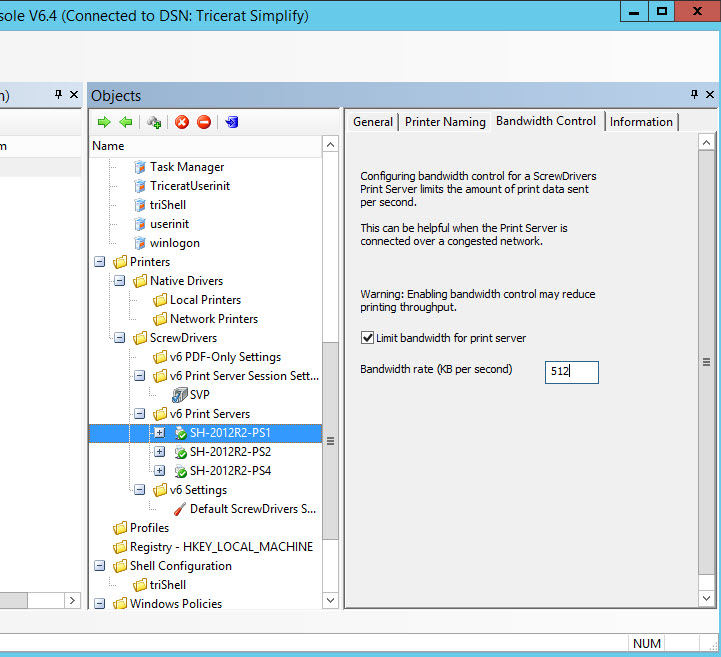
To enable bandwidth control for a print server, navigate to the bandwidth control tab and check the 'Limit bandwidth for print server' check box.
Type the desired bandwidth rate, which is always expressed in terms of KB per second then save the object.
In the example above, ScrewDrivers Print Server SH-2012R2-PS1 has been configured to use bandwidth control with a maximum bandwidth rate of 512 KB per second.
Bandwidth control configuration changes are reflected in the Simplify database immediately. Changes are reflected in the connection to the ScrewDrivers Print Server the next time a user who has printer assignments from that Print Server logs on. Bandwidth control configuration changes do not affect print jobs in progress. Bandwidth control configuration changes do not require any services to be restarted.