Introduction
Products such as Tricerat's Simplify Suite typically use either Windows credentials or SQL Server credentials for authentication and to secure access to Microsoft SQL Server databases. For version 6.3 (and later), Tricerat supports a new authentication mode called Static Windows Authentication. This document describes how Tricerat products implement database credentials and authentication.
Authentication Modes
For version 6.3 (and later), three authentication modes are supported:
- Windows Authentication
- SQL Authentication
- Static Windows Authentication
Windows Authentication
In this mode, the credentials of the current logged-on user are used to secure connections to Tricerat databases.
SQL Authentication
In this mode, SQL Server credentials are used to secure connections to Tricerat databases. The SQL Server credentials are separate from each user's Windows credentials.
Static Windows Authentication
In this mode, Windows credentials are used to secure connections to Tricerat databases. The credentials used are separate from individual users' Windows logon credentials.
Product Support
This matrix shows the database authentication modes supported for Tricerat products:
| Tricerat Product | Windows Authentication | SQL Server Authentication | Static Windows Authentication |
|---|---|---|---|
| Simplify Suite | Yes | Yes | Yes |
| ScrewDrivers Print Server | No | Yes | Yes |
| Service Based Printers | No | Yes | Yes |
Why No 'Windows Authentication Supported'?
For Simplify Suite, interactive programs such as Simplify Console are launched by logged-on users. For other Tricerat products, there is no 'logged-on Windows user'. ScrewDrivers Print Server, for example, is an unattended process that runs in the background but needs database access when Print Job Reporting is configured.
Installation Dialogs
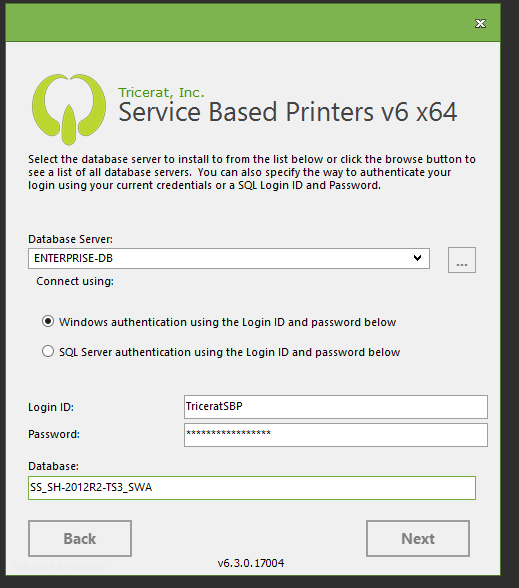
During installation, every Tricerat product is 'database aware'. If a product or a selected feature requires database access, the installer prompts for database access credentials.
Example: Simplify Suite
Here's an example of a Simplify Suite installation dialog on a Windows 2012 R2 Server machine highlighting the Static Windows Authentication configuration option:
Microsoft SQL Server Configuration
For any Tricerat database-oriented product, a SQL Login ID is required. The SQL Server configuration steps needed will vary based on the Tricerat product authentication mode selected. Please contact Tricerat Support with questions and requests for assistance.