Windows 7 Dynamic Virtual Channel Support
This page is retained for legacy deployments and historical reference. It may not apply to current ScrewDrivers releases.
For current documentation, see the ScrewDrivers Knowledge Base.
Did you know that the version of Remote Desktop Protocol supported by your Windows clients is critical to successful dynamic virtual channel communications? At a minimum, they should support v8.1 of the Remote Desktop Protocol (RDP).
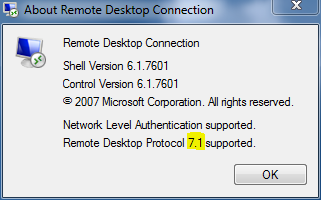
How do you check the supported RDP version?
- Open the mstsc program
- Right-click the program title bar and choose About. Example:
Upgrading your RDP version
Newer Windows operating systems support RDP v8.1 or higher but Windows 7 (All Editions) clients do not. The Windows Update mechanism will not automatically provide an update for the RDP version, you must apply these patches yourself.
Here is a link from Microsoft that discusses this issue: https://support.microsoft.com/en-us/help/2830477/update-for-remoteapp-and-desktop-connections-feature-is-available-for We suggest you read all the available information from the Microsoft page.
For Windows 7 computers, you need to follow these steps if the supported RDP version is less than 8.1:
- Make sure you have applied all available important updates using the Windows Update feature
- Apply the KB2574819 patch: download 32bit download (download link retired — contact Tricerat Support) download 64bit patch (download link retired — contact Tricerat Support)
- Apply the KB2830477 patch: download 64bit patch (download link retired — contact Tricerat Support)
- Check the version of the supported RDP protocol using the method shown above after applying patches.